
OfficeOS blog
AI can change your app. Who checks the release?
AI coding tools can produce mobile app changes fast, but app owners still need scope, QA, and release judgment before users see the update.
AI can write the code for a small app update in minutes.
That speed helps. It also moves the hard question to a new place: can you trust the release?
If you own a mobile app and do not write the code yourself, an AI-generated diff can feel like progress and risk at the same time. The tool can change a screen, rename a button, add a field, or adjust a paywall. It cannot tell you, with product judgment, whether the app is ready for users.
Code output is not release ownership
Mobile apps have hidden dependencies.
A screen change can affect navigation. A new onboarding field can affect saved profiles. A paywall edit can affect subscription logic. A button fix can affect accessibility, layout, and analytics events. The code can compile while the product flow fails.
AI tools make code cheaper to produce. They do not remove the need for scope, QA, release notes, and App Store readiness. Someone still has to decide whether the change matches the request and whether the surrounding flows still work.
That someone often becomes the app owner.
You wanted a small update. Now you have to review a diff, guess which files matter, test the build, and decide whether to ship. If you cannot read the code with confidence, the AI tool has shifted the burden instead of removing it.
The owner needs proof, not a patch
A release-ready update should answer four questions.
- Which user problem did we address?
- Which files and screens changed?
- Which flows passed QA?
- Which risks remain?
An AI tool can help with the second question. It can list files, summarize edits, and generate a patch. The other questions require context about the product, the release, and the user.
For example, "add a goal question to onboarding" sounds contained. A proper check asks whether new users see it once, existing users skip it, account creation still works, analytics records the answer, and privacy copy still covers the collected data.
The patch does not prove those things. A QA report does.
AI changes need acceptance criteria before code
The best way to use AI on a mobile update is to narrow the request before code generation.
Bad request: "Improve onboarding."
Better request: "Add one goal question after account creation for new users. Save the answer to the user profile. Existing users should not see the question. Login, signup, and analytics must still pass."
That request gives the AI tool and the human reviewer a shared target. It also gives QA a checklist. Without acceptance criteria, the tool may solve a different problem than the one you meant.
Owners who skip this step often end up with a build that looks close but creates more review work. The screen changed, but nobody agreed on done.
QA should test the old paths too
Small updates can break flows that the request did not mention.
If the update touches onboarding, test login and returning users. If it touches a paywall, test restore purchases and subscriber access. If it touches permissions, test denied access and re-entry. If it touches analytics, confirm the events still fire with the names your reports expect.
AI does not know which flows matter most to your business unless someone tells it. Your release process should encode that knowledge before the build reaches users.
This matters for trust. Users do not care that the change came from AI, a freelancer, or an agency. They care whether the app works after the update.
Release notes force clarity
A good update report should be boring and useful.
It should say what changed, what passed, what did not change, and what needs follow-up. It should avoid vague claims like "improved onboarding" when the release added a specific field, changed a specific screen, or fixed a specific bug.
Release notes protect the owner too. Two weeks later, when support asks why a user saw a new question or why a paywall event changed, you need a record. Memory does not scale across releases.
OfficeOS adds the missing release layer
OfficeOS can use AI where it helps, but we do not hand you a patch and call it done.
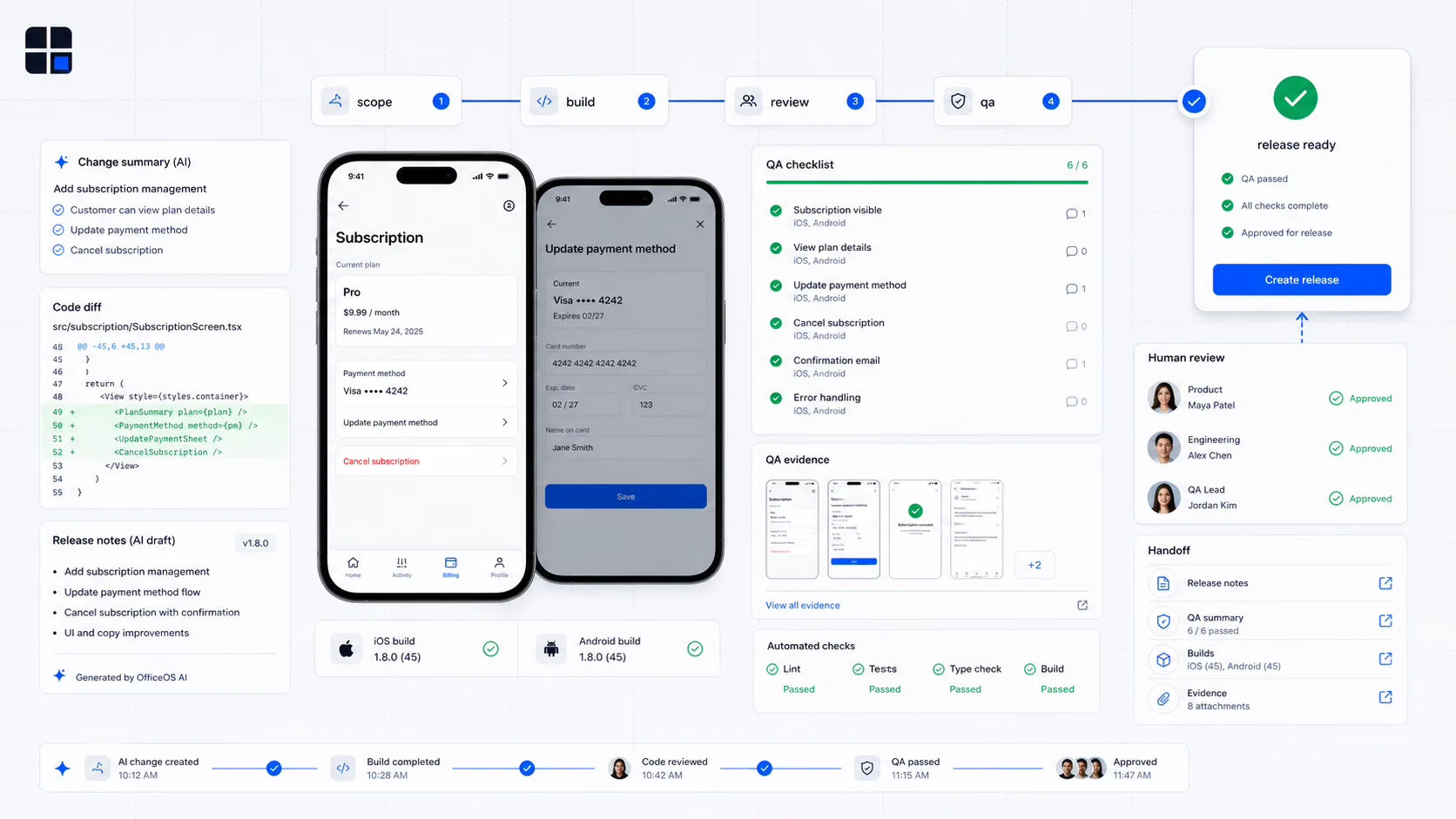
You send the update request. We scope it, write acceptance criteria, implement the change, run human QA, and prepare a release-ready handoff. The final report shows the change and the checks behind it.
That gives app owners a better bargain. You get the speed of modern tooling, plus the release judgment that protects your users.
AI can help make small updates faster. The app still needs a human accountable for the path from request to release.